Do you loop?

I was pulled into a meeting to help out with a query that needed to find some data to update a field. Basically the situation is:
1. a file is received from an external entity that has 2 pieces of information needed for the lookup, a GROUP and a UCC*
2. this file is loaded into a table and then an ETL (Extract, Transform, Load) process is called
3. the ETL needs to know a PriceType that is stored in a table that contains GROUP and VendorID
4. VendorID can be found in a query using the UCC

Ultimately what I need is the PriceType to include in my ETL process.
If I know the GROUP and UCC, I can find the VendorID that is needed to determine the correct PriceType.

So, the current process takes FOREVER – days!! It is using cursors and fetch next into the cursor and a whole lot of things that I don’t get! That is why we were having the meeting…to try and find a way to make the load run in a reasonable amount of time.

So I am listening to the conversation and my co-worker keeps talking about looping through the database to find the VendorID. And I am thinking, maybe I am not getting it, but it just seems like we can take the data we know, GROUP and UPC, and using JOINs get the VendorID. Why would we need to loop? So I asked and everyone agreed that what I was saying sounded reasonable, but weren’t really positive that what I was saying would work.

So, I rewrote this UPDATE_CURSOR statement with a query. I got it 90% there. The query was then put in a table and called as part of the ETL and I was missing a key field to join on in order to perform the update, but once that piece was included the process completed in an hour!

From 27 hours with no completion to complete in an hour! That is the power of joins and thinking in a set. If you are looping through your data set to find data in your tables it try to approach it and see if you can find a way for it to be done in a single query!!

The idea of iterating is a very programmatic approach and has it’s place, but not when you are trying to extract data from a database. You should try to think of everything you want to get and what connections have to be made in order to get that data.

Start with a small query. What is the main table that you need the most data from or has the key field that will be needed to find data in other tables? Write the query that just gets those fields from that main table. Where is the next piece of data that you need? Are there any criteria that need to be applied before JOINing into that data? Can you JOIN into the table or do you need to write a SUB-QUERY to extract just some of the data from that table? Once you get the details of the secondary information worked out, JOIN your main query to that and add the fields you need. It maybe that some of the fields you included you don’t need as output, but you do need as something to JOIN on in a later part of the query.

As you can see, building a query to get your full result set takes some time and knowledge of your database structure but it really how queries are supposed to work.

Now, once your application gets the result set returned, feel free to iterate through it as many times as you like to get data from it, but the idea of running one query to get a piece of information and looping through that data to run another query should now be contrary to all you believe as a Platypus Hunter.

*The UCC is part of the UPC that is on products. It is assigned to a manufacturer and is the first 6 digits in a UPC. Every product a company makes has a UPC that starts with their assigned UCC (more information can be found here http://www.insightu.org/hobby/guide_wd/ch3.htm)
70-461: Things I’ve learned – Part 1

I am sorry that it has been several days since I posted!  I have neglected my Platypus blog for studying for 70-461 and other parts of life.  I will be more dedicated and try to publish Monday, Wednesday and Friday.  I think that is an attainable publishing schedule.  If I have something important to share I will, but will try to shoot for that!

So, on to today’s topic.

Sometimes it is the subtleties that make for the biggest “aha” moments.  In an earlier post, I had some “aha”s in understanding some of the concepts of databases and set theory.  Besides those “aha”s, I have had at least one in each chapter of the testing guide for 70-461.  Just goes to show that no matter what you think you know there is always more out there to learn.  I hope that you find at least one new thing that you didn’t know either!

Chapter 1: Query Processing Sequence

The first thing I learned was the Logical processing of the SQL Statement.  I knew that it was written as:

SELECT…FROM…WHERE…GROUP BY…HAVING…ORDER BY

but I had never really given much thought into how the database itself processes that command.

Once I read it I realized that it made sense to do it this way:

FROM…WHERE…GROUP BY…HAVING…SELECT…ORDER BY

which IS the way an SQL query statement is evaluated.

I had always known that you can’t refer to a field in the WHERE clause by an alias given in the SELECT clause but didn’t know WHY that was true.  It is because when the WHERE is being evaluated the SELECT has not yet been evaluated so the alias is unknown to the WHERE clause.  However, the ORDER BY clause is processed AFTER the SELECT and it CAN use the aliases.  Makes total sense now!

Chapter 2: Auto-Generating Keys

I ALWAYS use an Identity property on a field in all my tables to create an auto-generating unique key.  It doesn’t matter if there is some other field that NEVER contains a duplicate.  LIAR!  At some point in time, in some universe, in a future far, far away, someone WILL duplicate that data.  You won’t be there to see it, but it will cause HAVOC in someone’s life.  In order to prevent that, just add your own unique key to all your tables.

That obviously isn’t what I learned in Chapter 2, I have been doing that for years.  What I did learn though is that there are OTHER types of auto-generating keys!

The Sequence Object – This is like a global auto-generating key!

GUIDs – I have used Global Unique Identifiers (GUIDs) just minimally in my programming and NEVER knew that you could use them in databases too!  You can generate sequential or non-sequential GUIDs and they are guarantee to be unique across space and time (and maybe even other dimensions!!).  There are two SQL functions that can create GUIDs – NEWID and NEWSEQUENTIALID.

Another useful tip I found in Chapter 2 had to do with starting at the lowest possible number if you are going to be using sequential numeric keys.  I always started at 1.  I don’t know why, it just seemed logical.  It is the first record in the table, it should be number one!  However, Chapter 2 points out that if I am using an INT datatype (which I almost always do), I could start at -2,147,48,648 and double my available pool of IDs.  I had never thought of that!

Case Expression – I was chastised in this chapter.  I, like many, have always refered to it as a CASE statement.  That is apparently the incorrect terminology.  It is an expression since it returns a value.  I also learned there are two ways to write the expression.  There is the simple form and the searched form.

I have always used the searched form.

CASE WHEN IsActive = '0' THEN 'No' WHEN IsActive = '1' THEN 'Yes' ELSE 'Unknown' END

And while technically that is correct and works, it could be written using the the simple form:

CASE IsActive WHEN 0 THEN 'No' WHEN 1 THEN 'Yes' ELSE 'Unknown' END

I had never seen this structure for a CASE Expression.  It is used when you want to take a simple input and compare it.  In this case, the field IsActive can either be zero or 1 and in our query we want to show ‘Yes’ for 1 and ‘No’ for 0 (zero) and ‘Unknown’ if it is anything else.  I had the opportunity to use this structure the very next day!

The searched form can be used to decide output based on predicate logic:
CASE WHEN Price > 100 THEN 'Pricey' WHEN Price < 5 THEN 'Cheapy' ELSE 'Just Right' END

The book doesn’t say if there is a difference in the database to process the two different forms. I will have to go research that and will let you know what I find.

70-461 Status

I am currently reading Chapter 8 which puts me about 1/2 way through the book. I am feeling really good about my existing ablities and knowledge and am still learning more and more! I hope to schedule the test at the end of May!

Dealing with a Bad Design – #1

I am sure that there will be many posts about dealing with bad design. So, I am going to number them as we go so I can see just how many different bad designs need a solution!

Duplicate Fields

Like many shops, the Court never had a DBA.  If you look at the Court’s PDB (Platypus Database) it is obvious that developers with no idea on how to create a relational database had “designed” it.  For over 20 years, developers had just added tables as they needed for their specific task.  To make matters worse, the platform is an IBM iSeries (formerly known as the AS400) where, depending on how a program is written, a change to a table design requires the recompilation of all programs that use the table.  And since there was no source control process it was impossible to tell WHICH programs would need to be recompiled.

The solution of course was to copy an existing table that had most of what the new process needed, rename it, and just add a few new fields…viola!!
That was the database design process.

This causes havoc when trying to write applications that need to interface with the database. The first issue, how do you keep all the data synchronized? If you update data in one table, how does it get updated in the other? The second issue, which fields need to be included in a query? The ones from the first table or the second, almost identical, table? Unfortunately in cases like this the only way to know is to ask someone and learn the structure. Eventually you will figure out when to use which table.

Fake Dates

Another example, back in the day when storage was a main consideration and before there were specific date fields, the Court decided to use a six digit INTEGER data type as the ‘Date’ field, YYMMDD. So looking at the date 111 – what date would you figure that to be? Did you guess January 11, 2000? No? huh, I’m surprised that you didn’t see that 😉

Then there was the Y2K issue. A perfect time to fix that bad decision because by then the AS400 DID have a Date datatype. Nope…let’s just add an EIGHT long INTEGER data type to every table that duplicates the six digit date and store the dates as YYYYMMDD.

And again we have to rely on someone making sure that all the dates are updated correctly. But of course there are exceptions. There’s at least one table that the eight digit date did not get added. It has to be joined into another table using the six digit date…but sometimes that data isn’t updated so the query returns no data.

Committing Spreadsheet

But I think one of the more prevalent bad design decisions is not creating the proper many to many structure – committing spreadsheet. Remember in the last post we talked about normalization and the many-to-many relationship of Jurors to Trials. The WRONG way to store this information is to do something like:

TrialID DefendantName Juror1 Juror2 Juror3 Juror4 Juror5 Juror6 ....Juror 25

Here’s why this is wrong. It is rigid – what if someone wants 26 jurors? Now you have to change the table design (and maybe the application) just to add one more person to a Jury Panel. What if they only want 20 Jurors? now there are NULLs in the data for Juror21 – Juror25. (While NULL has its place in databases this is not one of them – NULL means ‘unknown’ – these Jurors are not unknown – they don’t exist, that is a different state.)

Other Platypus Designs

I would love to hear how your PDB is designed! Send me an email or comment on your design issues and I will see if I have a solution to post for you!

Developer Golden Egg

When you have to work with a database where a non-PDB Hunter has committed spreadsheet, you can use SQL to create what SHOULD have been done. Using a UNION we can create the many-to-many table like so:

SELECT 1 as ID, TrialID, Juror1 As JurorID FROM BadTable Where Juror1 is not null
UNION
SELECT 2, TrialID, Juror2 FROM BadTable Where Juror2 is not null
...
SELECT 25, TrialID, Juror25 FROM BadTable Where Juror25 is not null

Now you have a result set that is normalized and can be used as part of another query, to join into, display results from, the same things you could do with it if it HAD been designed correctly.

Normalizing – How do you do it??

Hopefully everyone has read FundamentalsOfDBDesign by Paul Litwin that I mentioned in the last post.  (If not, perhaps take a few minutes to stop and read it and then come back and join us, understanding some of those basics will be key to this installment.  It’s ok, this post will still be here waiting when you finish.)

There are many pages out there that talk about normalizing data.  I feel that many of them only go part way.  Some of them are a little too “canned”.  Even Litwin’s examples are some what simplified.  They all have a membership database, or a customer database or something simple and a list of fields to be categorized.  Well that’s all fine and dandy, but how do you get to that point?  Where did that list of fields come from?  How do you work with data in the real world?  I could never find any websites or blog posts on HOW to get that.  Here’s how I do it.

I was lucky enough at the Court to be able to design and build from scratch and then re-do, a couple of times for version upgrades, a core Court application – the Jury Management System (JMS).  When I started at the Court the “Jury System” on the AS400 was basically an upload of a text file of summoned Jurors on which one or two functions or processes could be performed.  All the rest of the work was performed manually – mail merging letters, tracking time worked, tracking panels served on, tracking trials for which a panelist was selected, and making payments, just to name a few.  it took months to get a Jury term processed and delivered to Accounting to start the payment process. There was one report that was manually compiled every two weeks. I was assigned the task of creating a new system that would allow the staff to automate all these processes and more.

During the initial design phase I took the time to create a proper relational database.  Over the past 10 years and 3 major revisions that database structure is still valid and the only required modifications have been to include new data that wasn’t part of the original application or to accommodate major changes in functionality.

When you are lucky enough to get to design from scratch here are some things that you should look for to help determine what fields you need to have in your database:

What are your inputs?

In my case it was the text file that I was being sent that contained the names of people who had been summoned for jury duty.  Did I need everything from the file? No, but I could look at the file and determine I should probably get their name, address, date for which they were summoned, other information that identified the people that have been asked to complete a form and return it to the Jury Division. I didn’t need the name of the Authorizing Clerk of the Court or the Court’s address. Those pieces of information may have been important to the Agency creating and sending the Court the file, but not to our application.

What are you expected to output?

Like most applications, what I was building was replacing something, some manual task that some person has to spend a lot of time compiling and working. Well, what did that person produce? Is it a report? What is on the report? If you are being asked to report the number of Trials that a person served on you need to make sure that somewhere in the database you capture some trial information and what jurors served on that trial. If you don’t capture it, you can’t report on it. A lot of developers skip this step and it is CRUCIAL!

What is your application expected to do? What data will it need in order to perform that task?

One function the Jury application was expected to perform was to calculate the number of hours a Juror worked in order to pay them. Well, in order to do that you have to know all the days a person was in attendance, what time they arrive and what time they left. But, there are special rules for Public Employees. They only get paid when they are at the Court outside their regular working hours because Agencies are required to pay employees while on Jury Duty. So now we need to know which of the people who showed up for Jury Duty are public employees and what their regular start and end times are. But then there are special cases like Substitute Teachers, who are Public Employees, but get paid for all hours worked; or, teachers on Summer Break. Jurors also get paid for mileage to and from their primary residence to the Court round-trip for each day they come. Now you need to know the Round Trip Mileage for each person.
All of these rules determine what data is required to be stored in order for the application to do the appropriate calculation to pay the Juror correctly.

Now you have a list of all the fields you think that your application will need to do the work it is supposed to do.  Now what?  Well, you have to decide what tables to create.  How do you do that??

Well, by looking at the functions your application is required to perform, inputs and outputs you should have a general idea of some of your major tables.  In the case of the JMS, and given just the information I shared above, I would determine a need for the following tables: JUROR, TRIAL and ATTENDANCE.  Plus, we also need some where to keep all the information about PUBLIC EMPLOYEES – we need to know who they are and when they work and if there are any special conditions that affect their pay.  We need to know where the JURORs live so an ADDRESS table might be a good candidate.

So you go through your list of potential fields and determine what table they belong to.  It doesn’t matter if you don’t get it right the first time, you just need to make a first pass and see what you KNOW goes certain places and then you’ll be left with the fields you’re not quite sure about.  It may turn out that something you thought was a FOR SURE you end up changing.

Each table must have a PRIMARY KEY.  I prefer auto-incrementing keys.  They are easy to create and maintain.  But regardless, perhaps there is a natural key that you prefer using, every table has a KEY.  So each table starts off having an ID field.  This ID refers to ONE row in the set.

The rest of the fiels in each table are added by asking yourself, when deciding if a field belongs in a table, “Does this field pertain to ONLY what is in this table?”.  Some things are no brainers.  In our list we have the fields from our input file: name, address, SSN, DOB, the date they are to show up for jury duty.  Those might at first be all things that you would select for the JURORs table.  The TRIALS that a JUROR served on?  That really isn’t information about the JUROR.  So you wouldn’t want to put TRIAL information in the JUROR table.

So where would you put TRIAL information that is about the JURORS?  We have a JUROR table that lists everything we know about the JUROR. We have a TRIAL table that lists everything about the TRIAL.  Where DO you store which JURORS served on which TRIALS?  In the JUROR_TRIAL table!   We will have a table that contains an ID for each row in this set and an ID for the JUROR and an ID for the TRIAL they served on.  (This structure is how a many-to-many relationship is represented: many jurors can serve on many trials.  We will get into relationships another day.)

Hopefully this has helped you to understand the actual steps taken to get a database design into a normalized state.

Feel free to contact me if you need any assistance with your design or have any questions about normalization!

theplatypusdatabase@gmail.com

First Weapon – Understanding the Relational Model

For years I have been and will continue to recommend that anyone working with databases and queries read the following articles

The Fundamentals of Relational Database Design by Paul Litwin

and

Understanding SQL Joins @ devshed.com

These two articles helped solidify my formal education in databases and for years I thought I understood the Relational Model and some of the more advanced SQL Joins…which I did, to a point.  However, to be Platypus Hunters, we must delve deeper and understand how databases are represented by the relational model.

Over the past few weeks I have been reading Exam 70-461: Querying MS SQL Server 2012 Training Kit preparing to become a Microsoft Certified Solutions Associate: SQL Server 2012.  After reading Chapter 1 – Foundations of Querying I feel I have an even better understanding of the relational model and what makes something relational.  So, my Hunters-to-be, let’s discover Cobb and his relations.

There were several “aha” moments reading this first chapter.  The first came from reading this:

A relation in the relational model is what SQL calls a table.  The two are not synonymous.  You could say that a table is an attempt by SQL to represent a relation….

That made me re-think some of my preconceived notions about what I knew about databases, tables and the relational model.

So going forward with an open mind, I read:

Some of the most important principals to understand about T-SQL stem from the relational model’s core foundations-set theory and predicate logic.

Remember that the heading of a relation is a set of attributes, and the body a set of tuples.  So what is a set?  According to the creator of mathematical set theory, Georg Cantor, a set is described as follows:

“By a ‘set’ we mean any collection of M into a whole of definite, distinct objects m (which are called the ‘elements’ of M) of our perception or of our thought.”

Set Theory

Reading this chapter exposed me to concepts that I had knowledge of but no understanding.  I had heard “real” database people refer to tuples but had never really “gotten it”.  I had to go look up “tuple” on the All-Knowing Wikipedia.  As it relates to math it

is an ordered list of elements.   Tuples are usually written by listing the elements within parentheses ‘()’ and separated by commas; for example, (2,7,4,1,7) denotes a 5-tuple.

That was another “aha” for me.  I could see that this was a set of data, like what is returned from a query.  That made sense to me.

Looking into set theory I found that a relation has a heading and a body.  The heading is a set of attributes.  These attributes are referred to by name and type .  The body is a set of tuples.  These concepts become transformed by SQL into something recognizable.  The relation is a table showing the heading as column names and tuples as rows in the table.

(So, remember in the last episode when we said that thinking of a database like a spreadsheet was ok for non-Hunters, this concept is the real deal.)

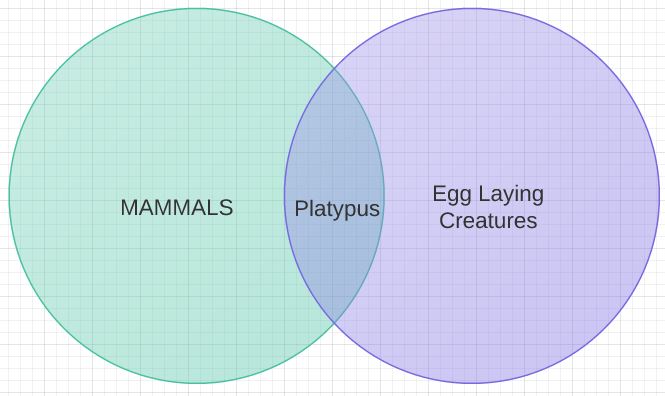
Do you remember back in elementary school when you learned about VENN diagrams?  You had to draw all those circles that represented MAMMALS and EGG LAYING CREATURES and come up with the INTERSECTION showing Mammals that are Egg Laying Creatures?

Venn Diagram

Venn Diagram

That’s Set Theory – see you know this – you just learned it so long ago, you’ve forgotten!

Back to Cantor’s definition of a set.  It should be considered as a single, whole thing….a SET of something, in this case tuples.  It should be a set with no duplicates (there are exceptions to this in the real world, but theoretically…) and while not explicitly stated, no order to the set – as one of the tek-tip gurus would say, think of a result set as a bag of marbles, all the records jumbled up together – (when, in a query, you add sorting you have created a sequence, not a relation – a topic for another day!)

Predicate Logic

A predicate is defined as an expression that when applied to an object makes a proposition evaluate to either true or false. For instance, ‘hire date greater than 1/1/2012’ is an example of a predicate. For each employee you can evaluate this predicate and create a proposition that returns true if that employee was hired after that date.  Any expression that you can write to evaluate criteria to true or false is a predicate.  Is it greater than another number, does a name match, any other criteria.

Predicate Logic is a core element of the relational model.  Using predicates you can enforce data integrity, filter data, and even define the data model.

While I didn’t study these concepts formally, I did have an intuitive understanding of them. Understanding these concepts will be the first weapon in your arsenal to fight the Platypus Database.

Developer’s Golden Egg

I have decided that when I have some tidbit that might be helpful to a certain group of my readership, the Platypus will give you a Golden Egg – the first one goes to the Developers!  In fact, for a while, most of them will probably be for developers…that is what I did for a long time!

One thing that I tried to do as an application developer was iterate through the results of my queries in my application and not on the database.  Remember, think of the results of your query as a set.  So, if you need to get all the rows that meet some criteria try to figure out a way using a query to just return to your program the information in which you are interested.   Conversely, try not to return ALL the rows and have your application determine which ones meet your criteria, let the database do what databases are good at doing.

Also. try to use aggregate functions when possible.  Don’t bring back a whole record set to your application and count the number of rows, if you just need to know the total number of rows use the COUNT function and just return what you need.

What is a database?

Recently I have been reading ‘Microsoft SQL Server 2012 – A Beginner’s Guide 5th Edition’.  I like the way it describes and gives an overview of database terminology.  There are database components which make up a database system.  The components are database application programs, client components, database servers and the databases.

A database application program is software that is written to access a database.  Most people who use a special program at work that retrieves customer data or vendor data or product information are using a database application program.

A client component is a special program written to interact with a database.  These are usually written by the companies that create databases.

A database server is used to manage the data stored in the database and to interact with the requests sent by database application programs or client components.

A database is a collection of data arranged in a logical manner that can be accessed via a user interface which allows the user to create databases, add, retrieve and modify data and manage the data.

I thought that broke down the components nicely and in a very understandable way.

Unfortunately in the real world the database is rarely “arranged in a logical manner”.  You can only hope that the programmer that was hired to develop some custom application or add onto an Off-the-Shelf application had some clue about the rules of database design and you get to work with data that is normalized.  However, if that was the case you probably wouldn’t be at The Platypus Database web site looking for help.  Most likely the database you are accessing is not normalized, has bad data or some other tragedy of a design flaw.

Hopefully you are here to learn about databases BEFORE you design one and you will be able to pass along a database that follows the rules and will be a joy for someone to work with in the future.

So, let’s start with a few basics.  You can build a database in a variety of database programs:  Microsoft Access, Microsoft SQL Server, IBM DB2, MySQL, Oracle, Paradox, and a few others.  These are just the ones that I can come up with off the top of my head.  Some of these are database servers:  MySQL, Oracle, MS SQL Server and the DB2.  MS Access is usually just a local database but can be set up to act like a database server.  Some are free and some cost money and some offer both a free and paid version.

Most of these programs come with a client component that allow you to access the server or write queries or create stored procedures.  MS SQL Server has SQL Server Management Studio.  MS Access is the client component to access MS Access databases.  Oracle Enterprise Manager Database Control or SQL Developer can be used to connect and manage Oracle databases.

All of these applications that connect to databases depend on SQL – Structured Query Language.  This is how the users tell the database what they want it to do: Create a table, return some data, insert or delete some data.  (If you are a programmer creating or modifying a database application program, you will need to consult the specific programming language documentation to determine how to connect to your database and the requirements for sending queries and processing results – specific programming languages are beyond the scope of The Platypus Database.)  Second only to understanding normalization, the ability to write and understand how queries work is key to efficiently extracting data from the database.

Back to our main question, what is a database?  When most people talk about a database they are usually talking about the collection of tables that hold data.  If you are familiar with spreadsheets you can easily transfer that understanding to database tables.  A column in a spreadsheet correlates to a FIELD in a database.  A row in a spreadsheet equals a RECORD in a database.  Now imagine that all the worksheets in a workbook are TABLES in a database.  So for most people, a good basic conceptual understanding of what databases are, can be summed up as: a collection of DATA, held in RECORDS, which are collected in TABLES and accessed using QUERIES.

But you are not most people, you are Platypus Hunters in training.  So next time we will cover some basics of Cobb’s Relational Model.

Until then, Happy Hunting!

Welcome all Platypus Hunters

Welcome to the Platypus Database – a blog dedicated to the databases all over the world that were not designed, but seemingly put together with very little thought – like the Platypus

220px-Platypus-sketch

Not to malign the poor Platypus, but it does look like no one really thought about how it would look with all those different parts stuck together like that – and it lays eggs, which for a mammal is kind of weird.

About ten years ago I posted this discussion at www.tek-tips.com asking if anyone else had to deal the same issues in their databases that I was finding – no normalization, shortcuts to avoid having to do things the right way, dates, validation (mostly the lack of),  and other situations.  (The thread quickly deteriorated into a treatise on Chimera Database – which almost became the name of this blog but I couldn’t get it to work as well.)

So why am I writing this blog?

I developed many applications against the Platypus Database over the past ten years and learned many things that are useful in certain situations when dealing with bad data and bad design.  You need to learn monster SQL skills and really understand the power of OUTER JOINS to overcome some of the issues you will find.  I would like to share those tips with other developers to help them learn how to use the power of the query to only get the data you really need into your application and minimize database calls.

As a way to continually improve and learn myself, I am working towards my MS SQL Server 2012 certification.  I want to blog about things I find as I learn about MS SQL Server and the studying and testing that I find exciting and want to share.

At this same time, my friend Jenny is trying to find a way to get into the IT world and I have been looking and looking for some web pages that can explain some basics about databases.  Every page that I found was either someone asking for help to design their database or did not mention normalization at all or if it did mention it, didn’t apply it correctly.  If you are going to work with databases in any way, you should understand the basic concepts and how to create a real database that follows the rules.

So, I am finally spurred into action to write about these topics so my friend can benefit and learn things the right way and we can all move towards certification as Platypus Hunters.

Thanks for dropping by, I hope to see you again soon!

Leslie Andrews, Platypus Hunter Extraordinaire